

Find your fit
Who it is for
SignNow suits teams that regularly exchange forms, agreements or approval packets. Shared workspaces and team documents can reduce reliance on one employee's login, while administrators should check who can see, prepare and send each class of document.
The work it supports
Core capabilities
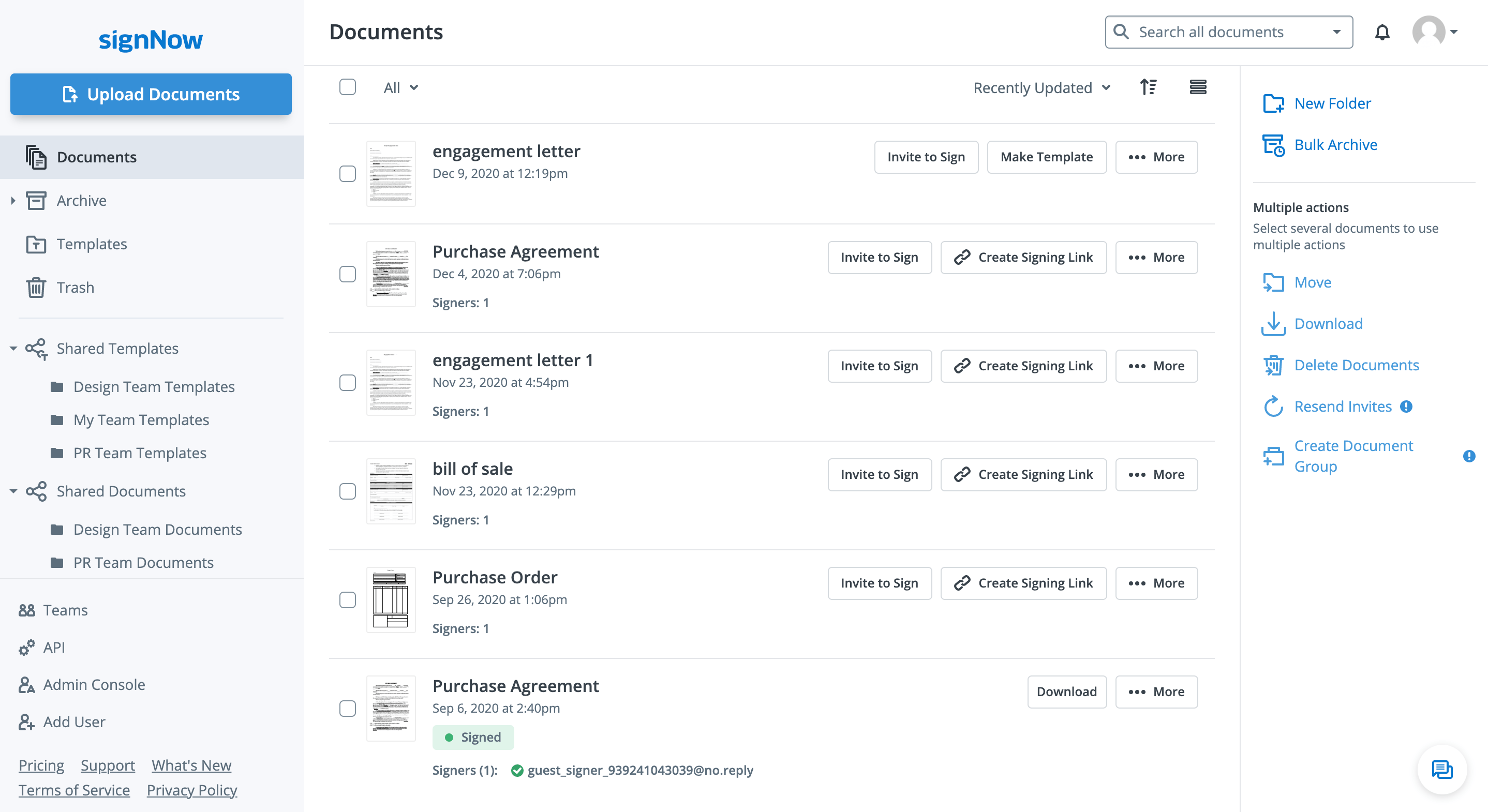
SignNow is airSlate's electronic signature service for preparing documents, requesting signatures and tracking completion. It supports one-off sends as well as reusable templates for repeated document work.
A template retains reusable fields, roles and optional signing order. Sending from it creates a fresh document; later edits to the template do not rewrite previously generated documents.
Senders can set a sequential signing order after assigning fields and roles. They can also place more than one signer in the same step, allowing those recipients to act in parallel before the next step.
Understand the offer
Pricing and getting started
The help centre lists 100 included signature invites per user for an annual subscription or 10 per user monthly, with unused allowances not rolling over. A unique invitation or signing link generally counts as one invite regardless of the number of documents or recipients. An ordinary resend uses no additional allowance, but canceling an invite and sending a new one can count twice.
After included invites are used, SignNow describes automatic usage-based billing, with rates varying by plan. Free and legacy paid seats can track usage differently. Verify the actual account's plan, shared balance, billing cycle, overage rate and notification settings before a large send.
SignNow's official help overview offers a free trial. The checked official pages do not establish a consistent duration, so verify current eligibility, length and conversion terms before signing up.
When a trial or paid term expires, SignNow says existing documents and audit history remain viewable and downloadable in a read-only mode, while new uploads, edits and invitations stop. Confirm access and export procedures before treating the service as the sole long-term archive.
Look a little closer
Before you choose
For repeated multi-file packets, compare a one-time document group with a document group template. SignNow says the template keeps a reusable package and creates a new signing copy for each send. Test which setup fits the team's packet changes.
The invite page for group templates offers controls for signing order, recipient email settings, reminders, expiration and two-factor protection. Check which of those controls are available in the chosen plan and whether the workflow fits the document's sensitivity.
In a pilot, check whether the dashboard gives the team the status and follow-up view it needs for drafts, awaiting signatures and completed documents. SignNow describes sender access to recipient progress and completed-copy downloads.
SignNow's audit trail records signing actions and can be exported with a signed document. Review the resulting file and its history for your retention needs; an audit trail alone does not decide a document's legal suitability.
Pilot a representative signing packet: prepare a reusable template, assign roles, test sequence and parallel signers, inspect recipient authentication, complete the document, and export the signed copy with history. Record how many invites the pilot consumes.
For sensitive or regulated documents, ask the vendor for current security and compliance documentation and confirm the intended signer-verification method, jurisdiction and plan features with the responsible team. The vendor describes encryption, role controls and authentication options, but those statements do not establish that every document or workflow meets a particular legal requirement.
When keeping signed documents outside SignNow, test cloud export from the actual account and workspace roles. SignNow says My Account can manually export signed files to a chosen folder, while a workspace administrator's Cloud Storages connection allows one cloud storage service but no manual export or folder choice; both offer a with-history option. Inspect a representative signed copy and audit log at the destination, and ask which other records need a separate path. No account export or complete archive was verified here.
For single SignNow invites on an eligible plan, compare recipient authentication before sending. The invite can require a password, SMS code or phone-call code; SignNow delivers the phone codes, but the sender must share a password separately through a secure channel. This two-factor option does not apply to bulk invites or invite links. Use a fictional recipient and non-sensitive document to check the method and plan entitlement before a real agreement.
For time-sensitive signing on an eligible SignNow plan, a sender can schedule an invite using the sender’s local time zone. Editing the document before delivery cancels the pending schedule, so reschedule it after saving. Invite allowance is deducted when the invite sends, not when it is scheduled; an expired or changed plan or exhausted allowance can leave it marked Delivery Failed. Check the document’s status after edits and at the planned send time before relying on delivery.
Before relying on a SignNow audit packet, compare a harmless sample’s on-screen History with its downloaded PDF with History. SignNow displays History times in your local time zone but uses UTC in the PDF, with the log on the last page. Label or convert the time zone when matching events for a reviewer so the same action does not appear to have conflicting times.
Before removing a SignNow Workspace member, test Transfer Document Ownership with harmless documents. SignNow requires the administrator and successor to belong to at least the same Workspaces as the original owner; otherwise the transfer cannot proceed. The transfer reassigns pending invites and completed-document ownership while preserving the original signature records. Removing a member from their final Workspace prompts a warning that their documents will be lost unless ownership is transferred first. Confirm the successor can find the transferred files and follow up on pending invites before a real offboarding step.
Before correcting a SignNow request that has already been sent, check the recipient statuses and what must change. If the only problem is a recipient who has not filled out their part, SignNow says Replace Recipient can change that recipient without canceling; its invite guide lists replacement as an action that does not use another invite. Changing fields, pages or invite settings instead requires Cancel Invites for every recipient on the document, which loses all invite progress. Canceling does not restore the used invite allowance, and sending the corrected request counts as another invite. Verify the recipient list and remaining allowance before using either path on a real document.
Before a SignNow Bulk Invite to several Signer roles, check a fictional two-signer CSV against the intended template. When signer addresses vary, map a separate email column to each role; recipients who stay the same can have fixed emails on the template. Each CSV row creates a separate form, while signing order is set on the template outside Bulk Invite. SignNow says Bulk Invite does not support the Approver role, so choose another approval path if that role is required. Confirm the account's plan and invite allowance before sending a real batch.
If staff must add final information after an external SignNow signer finishes their part, set up that internal step before sending. SignNow says a document cannot be edited once it has been signed or its fields completed; its guide advises adding an internal signing role, assigning that role the later fields, and placing it last with ordered recipients. Review a fictional two-role packet without sending it to check field ownership, order and the chosen account's controls. Do not rely on reopening a completed document to add missing fields.
Before retiring a SignNow document, distinguish Archive from Delete. SignNow says Archive keeps a completed or no-longer-active document accessible and lets you restore it later. Delete moves a document to Trash, where it can still be restored; permanent deletion from Trash cannot be recovered. In a fictional no-document walkthrough, ask which workspace role can access each folder, how a sample record and its history would be exported, and which action fits the team's retention process before anyone permanently deletes a real file. The guide does not give a Trash recovery time window.
When a SignNow sender does not know the final signers, test delegated assignment with a fictional document before sharing an invite link. SignNow says at least one signing role must have an empty email, and this option works with invite links, not email or bulk invites. A document link is one-time, while a template link is reusable; only the first recipient can assign signer addresses before email requests go out in the specified order. Confirm who may distribute the link, the intended roles and the chosen account's access. Ask how the distributor is authenticated and the link is controlled; the guide does not establish those protections.
Before relying on a shared SignNow template, use a fictional file to compare Team Folder sharing with individual sharing. SignNow says a form cannot use both methods at once. Team Folder files remain editable only by the original owner from their personal account; individual sharing can grant View, Send or Edit, with Edit allowing template fields, roles and settings to change. Check whether intended teammates can see, send and edit under the chosen Workspace permissions. Ask who will maintain the template if the original owner leaves the team; the guide says that owner's shared files then become unshared and must be shared again. Do not assume access or continuity without checking the chosen account.
For a long SignNow form, ask whether a signer can pause and return before choosing the invitation route. SignNow says Save Progress and Finish Later retains a signing draft. An account holder can find it in Documents; a signer without an account can return through View Document in the original email invite. The guide says this save option is unavailable for guest invite links generated from a template. Use a fictional no-send form to check the chosen account, invitation route and device, and define how staff will help a signer resume; no actual draft recovery was tested.
For an individual SignNow template that sends different instructions to each signer, review its Edit Signer Emails settings whenever a role changes. SignNow says the preset subject and message can vary by signing role and step, but editing or removing a template role resets those messages and they must be added again. This control is for individual templates, not document group templates; a Bulk Invite instead applies one preset message to all recipients. Use a fictional no-send packet to inspect the intended messages after a role change, and confirm the chosen account's controls before real invites. No email delivery was tested.
21 distinct sources behind this profile. Research observed Oct 27, 2026. Features and offers can change.
View sources and research →
