

Find your fit
Who it is for
The vendor addresses finance teams managing employee expenses, including organizations operating across locations. Essentials and Pro target growing businesses, while Business and Enterprise provide options for larger teams.
The work it supports
Core capabilities
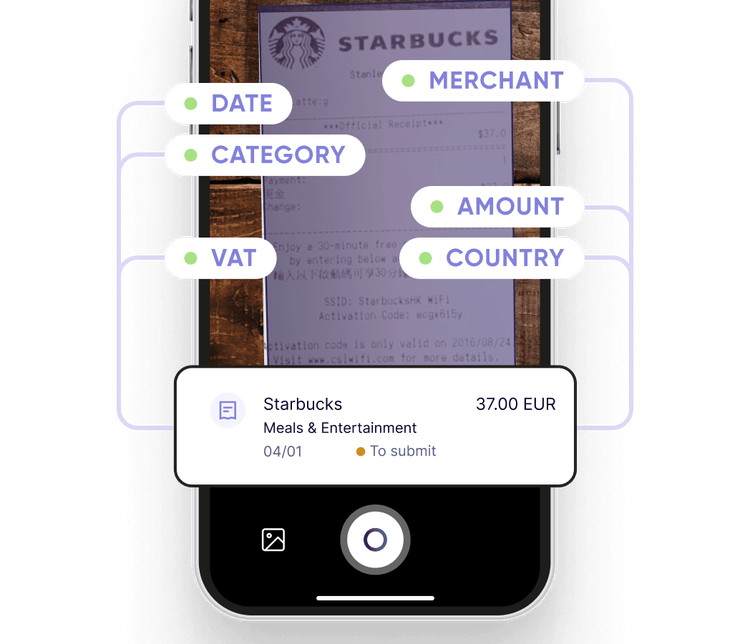
Scan receipts to prefill merchant, amount, date, currency, country and tax information, then categorize and submit the expense. Rydoo also documents combining multiple receipt pages and forwarding electronic receipts from a work email address.
Capture and manage expenses from the mobile app or desktop. Employees can upload receipts and log mileage as part of their expense submissions.
Managers can inspect digital receipts and approve expense claims. Approval rules can reflect company policies, with a single approval flow on Essentials and up to two approval levels on Pro.
Understand the offer
Pricing and getting started
Essentials and Pro start at 5 users. Business has custom pricing and starts at 30 active users; Enterprise also uses custom pricing and starts at 50 active users. For Business and Enterprise, Rydoo counts a user as active when they perform an action during the month, such as creating an expense, approving a transaction or running a report.
Look a little closer
Before you choose
Match the edition to the approval process and any add-ons you need. Accounts payable via Semine, controlling services and other extras are listed separately. The pricing page ties included Enterprise Smart Audit access to new customers subscribing on or after June 15, 2025; confirm the terms for an existing account.
Expense approval and employee payment are separate steps. Rydoo’s status guide says an Approved expense may still need Controller review and Finance reporting; Reported describes reimbursement in progress under company policy. Rydoo separately documents a wallet-based Reimbursements module for employee-paid expenses, with Treasurer access, preparer and authoriser roles, and employee bank details. Before relying on in-platform payouts, confirm that the module is offered for the chosen plan and country, its fees, and who reconciles the final payment.
For a receipt that combines spending categories or tax rates, check Rydoo's Split Expense workflow before submitting it as one expense. Rydoo says mobile splits should leave zero remaining, and the resulting entries return to To Do on mobile and web. Its web form allows up to 20 split amounts. Before approval, reconcile the split totals to the receipt and complete any remaining fields on each entry.
A policy flag in Rydoo does not always stop an expense at submission. Its current Help says an out-of-policy rule can warn while still allowing submission, or block submission until the expense is corrected. For a required control, ask an admin to check the Expense Rule's Out of Policy and Block to submit settings; try a harmless missing-receipt example and an allowed exception so staff know which items are blocked and which reach approval.
For foreign-currency expenses in Rydoo, check the conversion rule before approval. Rydoo says its default exchange rate comes from OpenExchangeRates and uses the receipt or invoice date. A company setting controls whether the rate can be edited; an edit changes the displayed rate and warns approver, controller and finance roles. If Smart Audit is enabled, the Activity tab also records the change. Ask finance to test a fictional foreign receipt, document when a rate override is allowed, and confirm who reviews it before export or reimbursement.
Before a submitted Rydoo expense is approved, check whether the employee can still correct it. Rydoo says an employee can Recall an expense while it remains Submitted, if the company has enabled that option; the item returns to To Do for editing and resubmission. Submitted expenses are not directly editable, and approved, controlled or reported items are outside this self-edit path. If Recall is unavailable, ask the company’s expense contact how to handle the correction. Rehearse the route with a harmless sample before relying on last-minute changes.
If a Rydoo reviewer rejects an expense, the employee can inspect why it was returned rather than treating it as a payment result. Depending on company policy, an Approver, Controller or Finance user can reject it; the expense returns to the employee's To Do with a reason or comment. The employee can correct eligible fields and use Reply and Submit to send it back. Rydoo's Finance guide says a resubmitted rejection enters a new approval flow. Rehearse a harmless rejected claim to see who receives notices and who must review it again before relying on the process.
Before relying on Rydoo to catch repeat expense submissions, test its two duplicate warnings with harmless receipts. Rydoo says uploading the same exact receipt file flags Duplicate, with Delete or Keep expense in the detail view. Duplicate OCR-read data can produce a Potential duplicate warning that links the other expense for comparison; Not a duplicate or Delete choices appear only while the item is To be verified or To submit. Compare the records before clearing or deleting a flag, and decide who reviews warnings before approval. These Help pages describe warning and review choices, not automatic prevention of double reimbursement.
Before month-end posting from Rydoo, have Finance use a fictional approved or controlled expense to check the accounting report's end date, branch, currency and file format. The end date can exclude later expenses already in To Report. When exporting, Finance can choose whether included expenses become Reported; compare the downloaded file with those statuses. If an expense is later Unreported to rerun the export, Rydoo says it remains in the earlier accounting report, so confirm how that report will be handled before reprocessing. Reported means inclusion in an accounting report, with reimbursement expected only if applicable; it does not prove payment was made.
When the usual Rydoo Approver or Controller will be away, plan who covers expense review. Rydoo documents choosing a temporary approver or controller in Profile > Personal Settings, entering the duration of the absence, and emailing the appointed user. With fictional expenses, check who can act on new and already-pending items during the absence and how the queue is handled when the period ends. The guide does not establish automatic reassignment of every pending expense or a reimbursement result.
Rydoo normally calculates mileage distance with Google Maps. An Admin can allow users to override that distance in Advanced settings, and Rydoo says the expense displays a note when a user changes it. For a fictional trip in a walkthrough, ask an Admin to show whether the override is enabled and how an approver would notice the edited distance before approval. The guide does not establish your company's mileage policy, approval outcome or reimbursement.
Where company policy enables Rydoo per diems, rates depend on trip date, time and destination. An included hotel breakfast can be entered as a deduction; separately, an Admin can turn on 'Show per diem warning' for a category when a per diem and expense occur on the same day. For a fictional trip with an included breakfast and a lunch receipt, ask an authorized user to compare the calculated allowance and selected deduction, then preview the category warning and who handles that meal claim. Confirm account settings and policy; a warning alone does not establish an automatic block, a reimbursement outcome or legal-rate compliance.
Rydoo lets an Admin enable approval for trips. Its setting and approver guides say a trip then needs approval before an expense can be linked, while the general trip-status guide also says a new 'To Submit' trip can appear in the expense dropdown. For a fictional trip, ask an Admin to show the setting and an authorized approver to walk through Submitted and Approved states, checking when the expense trip field becomes selectable. Confirm the behavior in your account before relying on that gate; trip approval does not establish booking prevention, expense approval or reimbursement.
Where Rydoo Cash Advances are enabled, an Admin can require approval before an advance is available as an expense payment method. Rydoo limits advance linking to regular expenses, excluding mileage and per diems, and says a Treasurer can complete a fully used advance so it no longer appears in that field. For a fictional advance, ask finance to compare the payment method on a regular expense and on mileage/per diem entries, then show who approves, completes and reconciles any open amount. Confirm the company's disbursement record separately; Rydoo's Paid status or approval alone does not prove an external transfer.
Before making emailed receipts a regular Rydoo intake channel, check how a forwarded email becomes expense entries. Rydoo says a body-only email is converted into a receipt, one JPEG/PDF/PNG attachment is used as the receipt, and multiple attachments create a separate expense for each. The sender must use the address linked to their Rydoo account or add a secondary forwarding address in personal settings. For a fictional no-send example with no attachment, one receipt and two receipts, ask staff to predict the entry count and confirm the intended owner and address before relying on this intake route. Check account settings and actual processing separately; the guide does not prove a message was received, approved or reimbursed.
Before a staff access change, have an authorized Rydoo user run a fictional expense export and check that both the rows and receipt evidence are usable. Rydoo documents personal expense selection and Excel or PDF exports; Finance users can view previous exports from all users in Exports > Files, subject to role-based filters. Its receipt-image guide says CSV, XLSX and XML expense exports contain streaming URLs for receipt images and attachments. Compare a sample export with its expense records, open sample links and save the actual receipt files required by your retention process. Confirm the exact export rights and format in your account. These guides do not establish post-deactivation access or how long the links remain usable.
37 distinct sources behind this profile. Research observed Oct 27, 2026. Features and offers can change.
View sources and research →
