

Find your fit
Who it is for
Service businesses that ask after a completed job. ReviewTec is positioned for businesses across North America, including the home-service, healthcare, automotive and legal examples on its website. It suits a repeatable process where a team finishes work and invites the customer to share an honest experience. A request tool supports that process; it does not substitute for delivering a good service.
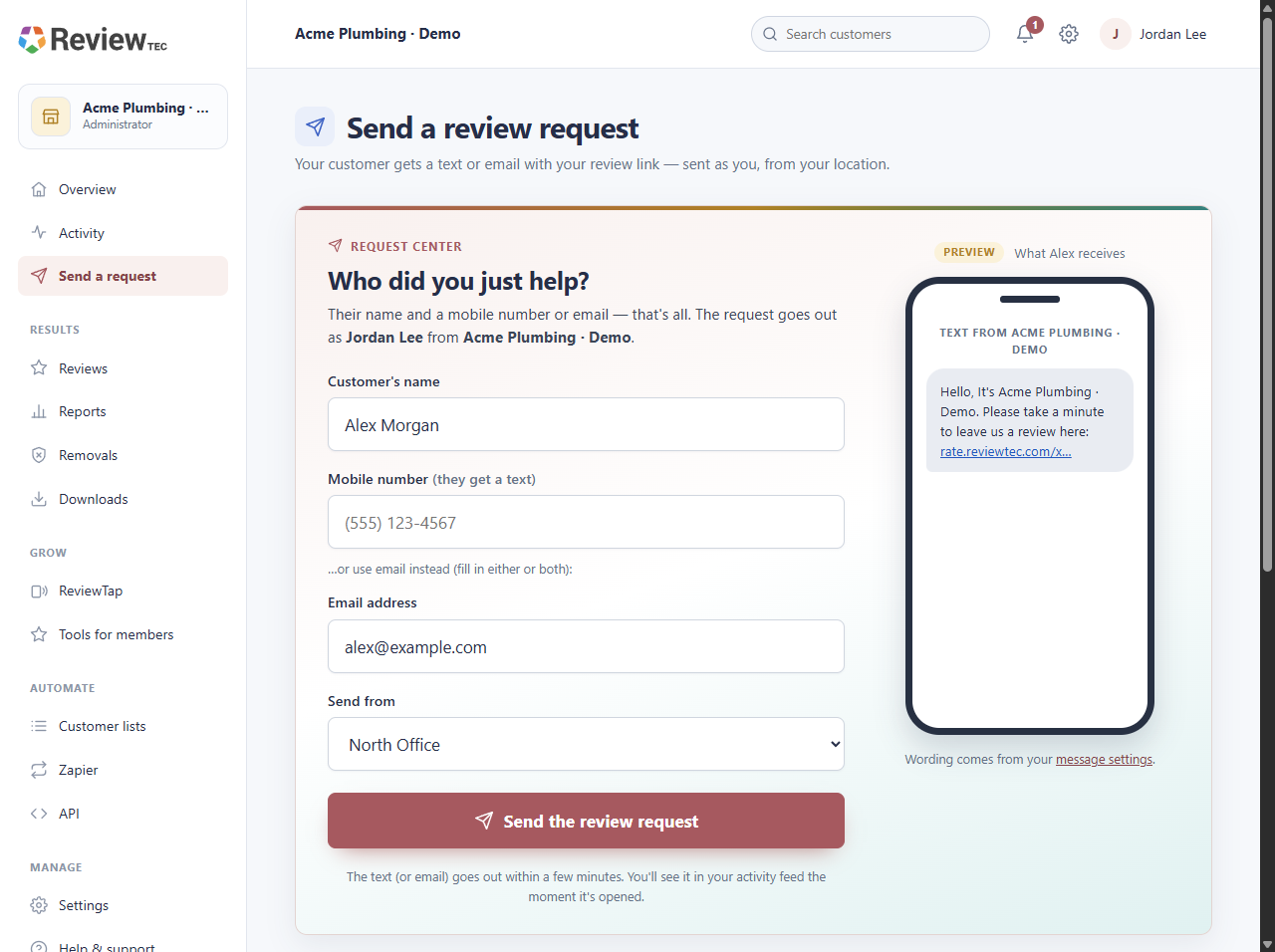
Small teams starting with a manual routine. Staff can open the request workflow from a regular phone, tablet or computer browser. Customers do not need a ReviewTec account or app. Guided setup establishes the business, its first location and review destinations before customer outreach begins.
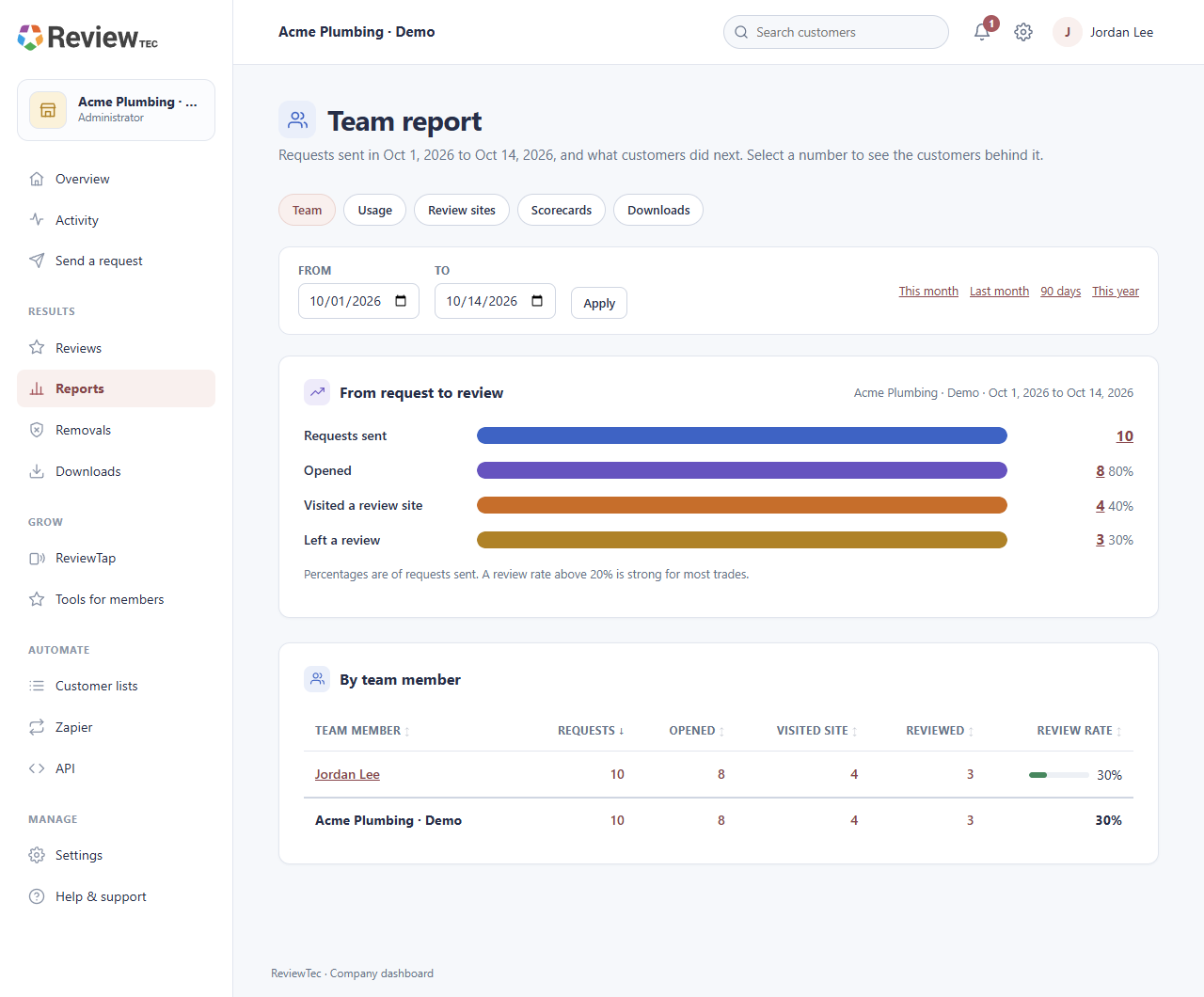
Businesses with multiple staff or locations. The base subscription includes five staff users and one location. Activity can be viewed by employee, location, customer and date; additional staff and locations are available as capacity add-ons. Plan the responsibilities and permissions for each person before rolling the workflow out to the whole business.
Agencies should compare the separate ReviewAccess offer. Its agency dashboard, branded client portals and wholesale business-account charges are distinct from the direct ReviewTec business subscription. Do not assume an agency portal or unlimited client businesses are included in the US$35 business price.
The work it supports
Core capabilities
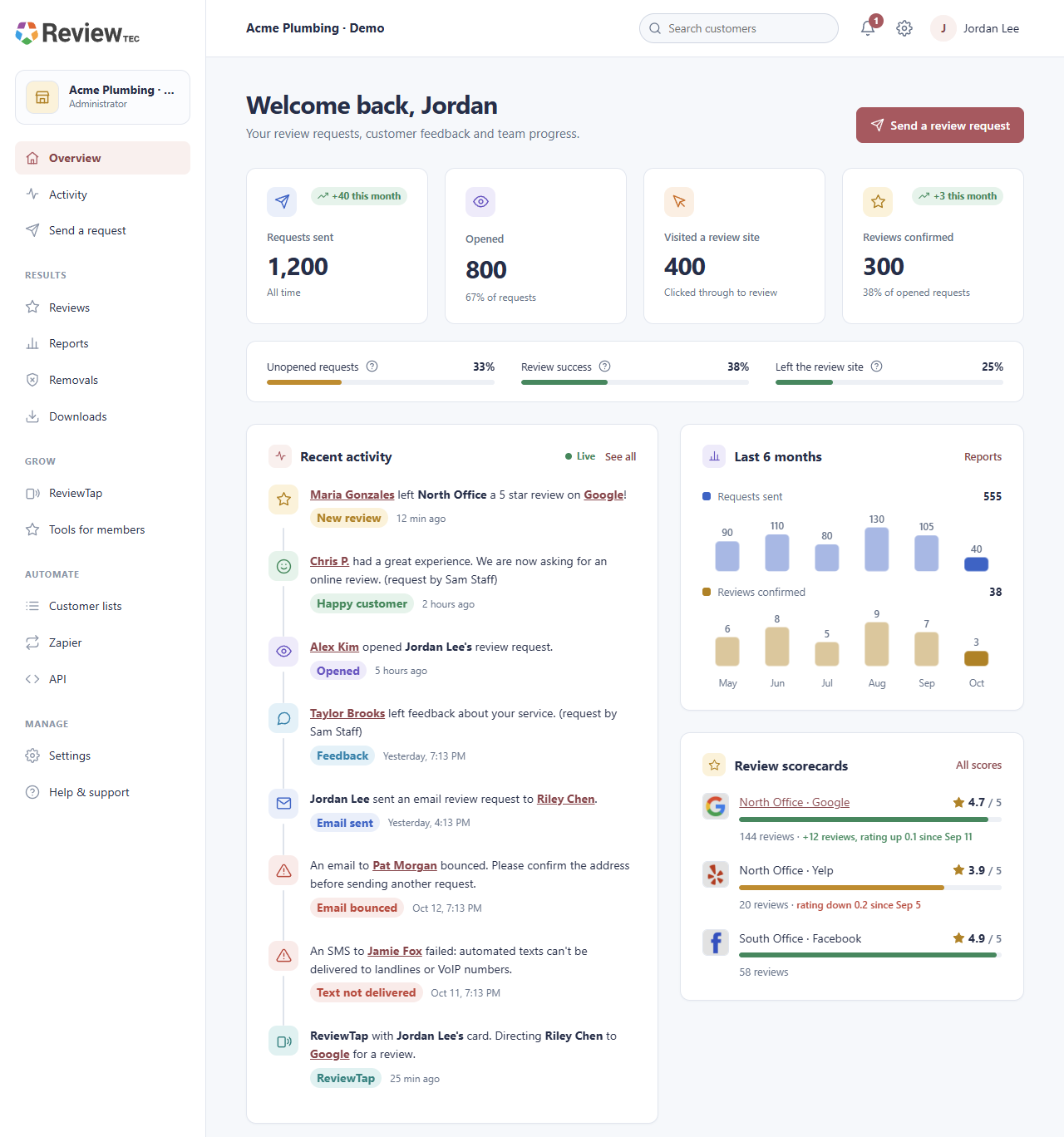
Branded SMS and email review requests. Ask customers after a completed job using the channel suited to the relationship. ReviewTec presents a branded request and directs the customer to the review process configured for the business. Staff can begin manually, while supported bulk and connected workflows are separate options to confirm as volume grows.
Automated reminders and thank-yous. Configure follow-up instead of relying on staff to remember each request. The published workflow describes one configured reminder for customers who have not opened or responded, and an optional customized thank-you after a review is confirmed. These are distinct actions with their own timing and wording; avoid treating every request as permission for repeated messages.
Activity and reputation reporting. Follow requests, opens, clicks, ratings and review matches in the dashboard. The public workflow also describes employee and location views, weekly progress scorecards, usage information and team reporting. A click, a private rating and a matched public review represent different stages, so use the right metric when comparing performance. Matching is described as available where possible, not a complete attribution guarantee.
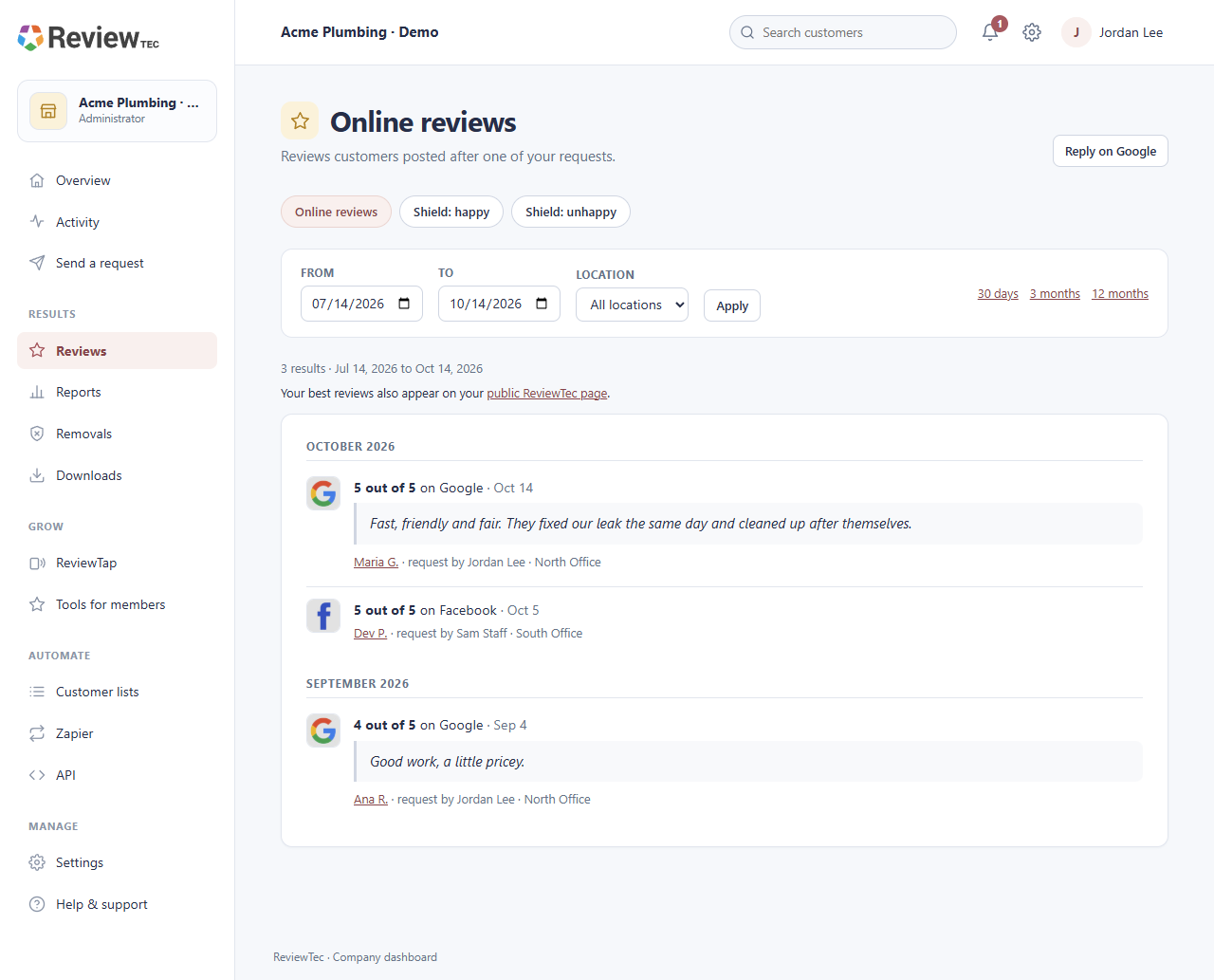
Google Business Profile connection and review replies. A connected account can guide customers to the right Google review destination and reply to recent Google reviews from the ReviewTec dashboard. Confirm the business-profile access and location being connected. The published reply capability does not establish identical reply or moderation tools for every other supported review site.
General and industry-specific review destinations. The published list includes Google, Facebook, Tripadvisor and BBB, along with examples such as Healthgrades, Angi and HomeAdvisor. Choose destinations that fit the business and its locations. A supported destination means a review workflow is available; it should not be read as full data synchronization or in-dashboard response support on every listed platform.
Configurable private customer feedback. Review Shield provides a private-feedback step when a customer reports a poor experience, allowing the business to receive the comments and follow up. The vendor describes the feature as optional and configurable. Decide how to handle that feedback consistently and check the policies of the public review platforms involved before choosing a routing configuration.
Public review showcase. The business account includes a shareable page for selected customer feedback. This gives teams a place to present feedback outside the internal activity dashboard. Confirm which content appears, how it is selected and how the page fits the business website; a showcase should not be mistaken for an independent rating of the software itself.
QR and tap-to-review access. QR tools and ReviewTap support let customers open the review journey during an in-person interaction. NFC cards complement text and email requests; they are optional, and physical cards or related purchases should be checked separately. The customer still chooses whether to write a review on the selected platform.
Staff visibility and location controls. Control team visibility and account permissions while linking the request experience to the correct business location and review sites. Begin with the included staff/location capacity, then check add-ons when scaling. This evidence establishes the described account controls, without asserting a specific enterprise role model or unlimited seats.
Understand the offer
Pricing and getting started
Free account setup, then paid activation. The current pricing page says signup is free and needs no card. You can set up the account, review page and Google review link, and send yourself a test request before paying. Sending requests to customers requires activation at US$35 per month or CA$45 per month. Free signup is therefore a setup stage, not an unlimited free sending plan.
Included base capacity. Activation includes 1,000 review requests each month, five staff users, one business location and one active review-removal slot. The current page also lists SMS/email requests, follow-up, reporting, supported review destinations, Review Shield, QR/ReviewTap support and the public showcase among the base tools. Check how the vendor counts requests and measures a billing cycle for your own workflow before choosing capacity.
Month-to-month subscription. The published business terms describe no long-term contract and cancellation through the billing page. Confirm the effective cancellation date, any renewal already in progress, taxes and refund terms before activation; a cancel-anytime statement alone does not establish a refund for time already paid.
Optional capacity and advanced tools. Extra request packs, business locations, staff users, CSV uploads, Zapier/API access and additional removal slots can be added or removed as business needs change. The captured pricing page does not state each add-on amount, so those costs are not invented here. Optional physical ReviewTap purchases should also be checked separately.
CloudLine member pricing. The pricing page advertises US$10 per month or CA$13 per month with a member code for customers already paying for ProsGrade or another CloudLine tool. This is a conditional member offer, not the standard price for every new ReviewTec account. Confirm eligibility and the code before relying on it in a budget.
Separate agency pricing. ReviewAccess starts at US$25 or CA$35 per active client business and says the first business is charged during signup, with no separate agency platform fee. It gives the agency its own dashboard and branded client portals; it is a distinct commercial offer. Compare its current terms directly if managing several businesses for clients.
Look a little closer
Before you choose
Shared ownership disclosure. SoftwareExplained and ReviewTec are part of the same software group. This profile uses ReviewTec published product information and retained official sources. Shared ownership is disclosed so readers can take it into account when comparing products.
Reviews remain the customer’s work. ReviewTec asks for feedback and provides a route to the review platforms. The customer writes and posts the review directly. Consider how your staff will invite customers fairly, keep the request wording accurate and comply with each destination’s current policies. Neither a request nor a five-star-looking example in vendor artwork is evidence of a promised outcome.
Use private-feedback routing deliberately. The vendor says Review Shield can be turned off. Review the enabled customer journey and the current policies of the public review platform before rollout, rather than assuming every feedback-routing configuration is appropriate. Decide who responds when private comments reveal a service problem.
Keep metrics and automation in context. Opens, clicks, private ratings and matched public reviews are separate measures. The site describes matching where possible. Configure reminders and thank-yous around the customer relationship and your sending permissions; the source material does not promise perfect delivery, universal matching or a particular conversion rate.
Confirm connected workflows and regional fit. The published audience is North American service businesses and the public offer displays USD and CAD. No wider country-by-country SMS support or identical integration coverage is established here. Ask about your specific source system, destination, request volume and add-on cost; a Zapier/API reference alone does not establish a native connection to every CRM.
Inspect the data and the actual setup. Review requests use customer contact information, while the published privacy policy describes personal-information collection and service providers. Check the current terms, access controls and data arrangements needed by your business. Use the clearly labeled setup test before sending anything to customers. The screenshots here are vendor-published examples, not this directory sending a request or operating a customer account.
4 distinct sources behind this profile. Research observed Oct 14, 2026. Features and offers can change.
View sources and research →
