

Find your fit
Who it is for
Freelancers and small businesses are the main audience. The number of clients and people who need account access are useful starting points for comparing plans: Free limits clients, while Enterprise pricing varies with the number of account users.
The work it supports
Core capabilities
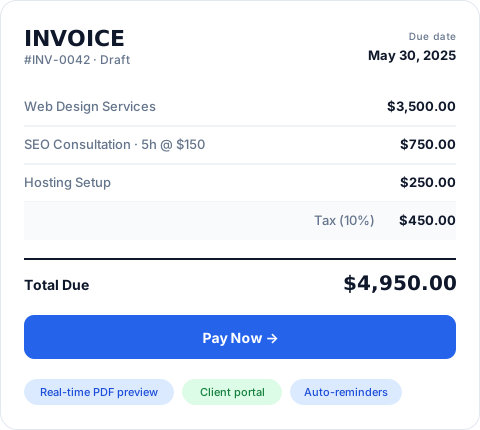
Create and send invoices while viewing a live PDF preview. A product library supplies reusable line-item details so users can build invoices without entering the same descriptions each time.
Send quotes for client approval, then turn an approved quote into a payable invoice. Invoice Ninja documents both one-click conversion and automatic conversion when a client approves.
Collect invoice payments through a connected gateway such as Stripe, PayPal, Square or GoCardless. Clients use a Pay Now button in their invoice portal. The Free plan includes online payment support.
Understand the offer
Pricing and getting started
The ongoing Free plan allows up to 5 clients and unlimited invoices. Invoice Ninja’s current pricing and features pages disagree on the Free invoice-template allowance; confirm the current number before choosing a plan. Ninja Pro adds unlimited clients and automatic late-payment reminders. Enterprise adds account users, permissions and bank-account sync; its fee scales with user count. Annual subscriptions are paid upfront for the year.
Look a little closer
Before you choose
Choose a payment gateway that supports the collection methods you need. The vendor says many gateways support token billing for recurring payments, which does not establish that every gateway does. Automatic reminders and bank sync also sit on different paid tiers, so compare the plan as well as the gateway.
For a hosted-service exit, check records and attachments separately. Invoice Ninja says Settings → Import/Export provides CSV, XLS or JSON for account records, while a ZIP of uploaded documents attached to invoices, quotes and proposals is available through Reports → Type: Document for Enterprise accounts. Have an authorized user test representative exports and confirm that the receiving system can use them before treating either file set as a complete migration.
Invoice Ninja’s hosted plan table lists recurring invoices and auto-billing on Free, but the vendor only says many payment gateways support token billing for automatic collection; support for every gateway is unconfirmed. Before using recurring bills with real clients, confirm that the chosen gateway supports the saved-payment method, check the invoice schedule and client authorization, and test the failed-payment follow-up.
Invoice Ninja says its hosted client portal is included on Free and describes emailed magic-link access. Its features page separately lists optional password protection, so confirm the actual sign-in setting and recipient access before sending customer invoices. Pro and Enterprise can remove Invoice Ninja branding; a custom portal subdomain is Enterprise. Check the chosen plan and visible portal URL before presenting the portal as a fully branded client experience.
For deposit billing, check what happens to the invoice after the first payment. Invoice Ninja says a partial-payment or deposit request can have its own due date; after the client pays that amount, the invoice updates to show the remaining balance and final due date. Use a fictional invoice to check the deposit amount, the remaining amount and both dates before relying on this flow with a client.
Treat a hosted Free account with old client invoices as something to maintain actively. Invoice Ninja's current Terms and Privacy Policy say Free accounts inactive for three months become "ghost" accounts scheduled for irreversible deletion and advise regular sign-ins. Set an access reminder and review the existing export options before relying on that account as an archive. "Scheduled" does not provide an exact deletion date or a recovery window.
If your team buys items for client work, separate the vendor purchase from the charge to the client. Invoice Ninja says an approved vendor PO automatically becomes a billable expense, while adding an expense to a client invoice is a subsequent action. Confirm plan access and run a fictional PO through approval, review the resulting expense, then inspect a draft client invoice for the amount and description. Agree who approves the purchase and client charge before using this with real transactions.
If billing clients for work time, start a fictional Invoice Ninja task timer and set a known work rate at the account, client or task level. Invoice Ninja says tracked task time can be moved to an invoice in one click and combined there with expenses or products. Before sending anything, inspect the draft invoice's hours, applied rate, task line total and any other lines; check which configured rate the sample actually used. Time tracking is listed on all plans, but this sample does not prove a live invoice was sent or paid.
For PEPPOL e-invoicing, check Invoice Ninja's Enterprise entitlement separately from ordinary invoice sending. Its listed Enterprise plan includes network access and 250 credits; one credit represents one e-invoice submission. Current Terms say purchased extra credits are valid for one year from purchase and are non-refundable. Before buying, confirm the intended account and deployment, recipient network registration, market requirements, annual submission volume and current pack terms. Review a fictional invoice's recipient and UBL fields with an authorized test path; the feature page does not establish legal compliance for a particular business.
For a fictional month-end handoff, imagine two client invoices and one recorded payment in a chosen date range. Invoice Ninja says clients can generate a portal statement with invoice history, payments and aging, then download it as a PDF. Compare the statement's dates and entries with the underlying invoice and payment records. Before using this with real clients, confirm the intended recipient's portal access and visible information under the account's actual sign-in settings.
For a fictional firm choosing hosted Ninja Pro or Enterprise, separate the software plan's renewal from recurring invoices sent to clients. Invoice Ninja's Terms say these plans auto-bill monthly or annually until the account is downgraded or cancelled; its pricing page says an annual plan is charged in one yearly payment. The Terms describe a full refund for monthly cancellation within the active month, and a 30-day window from an annual payment to cancel and request a full refund. The pricing FAQ separately advertises a general 30-day money-back promise for paid plans. Before paying or leaving, confirm the selected term, payment and renewal dates, which current refund wording applies to the account, and that a downgrade or cancellation has actually stopped plan auto-billing.
12 distinct sources behind this profile. Research observed Oct 27, 2026. Features and offers can change.
View sources and research →
