

Find your fit
Who it is for
The vendor addresses small and midsize service businesses, especially HVAC, plumbing and electrical teams with several trucks. A useful evaluation follows both an urgent service call and a planned recurring visit through the office and field process.
The work it supports
Core capabilities
Dispatchers can assign work orders across trucks, consider technician skill, location and availability, and track statuses such as traveling, working and complete. The multi-truck schedule is more useful when the business keeps customer and job details current.
FieldEdge describes generating and sending invoices from the field. Ask the vendor to show an on-site invoice, then confirm separately which payment methods, processing charges and settlement terms apply to your account.
For a repeat visit, FieldEdge says office staff can review past and quoted work, equipment details and service agreements in the customer record. Its mobile view gives technicians notes, customer history and equipment information, and photos can be attached to work orders. Trace one fictional equipment issue from call booking to the technician's view to check the records and role access in the proposed setup.
FieldEdge describes tracking service-agreement renewals, billing cycles and scheduled visits, with reminders and invoices. Its current US plan matrix lists basic agreements on Select and advanced agreements on Premier and Elite. Compare a fictional renewal and postponed visit in the quoted tier to check which reminder and invoice steps actually run before depending on automation.
Understand the offer
Pricing and getting started
FieldEdge lists Select, Premier and Elite with request-based pricing. Select covers core booking, dispatch, customer records and price book; Premier adds advanced dispatch and additional mobile licenses; Elite adds further reporting and management tools. Ask for an itemized proposal for the team's actual license and feature mix.
The pricing FAQ states that FieldEdge does not offer a free trial and describes guided onboarding and data transfer. Request a scoped demonstration and a written migration plan covering customer records, open jobs, price book, agreements and accounting links.
Support differs by tier: the current FAQ names chat for Select, email or phone for Premier, and a dedicated customer-success representative for Elite. Confirm hours, response commitments and implementation support in the proposal.
The FAQ says upgrades are available during a term while downgrades take effect at the end of the current contract period. Confirm duration, renewal, additional mobile users, add-ons and exit/data-export terms before signing.
The current US plan matrix includes two mobile app licenses with Select, four with Premier and six with Elite. Count the technicians who need mobile access and have the vendor itemize additional licenses in the quote; the included counts do not establish the total price for this team's setup.
FieldEdge lists general reporting across its tiers, but its US comparison marks Saved Reports as unavailable on Select, ten on Premier and unlimited on Elite. A dashboard view and a reusable saved report serve different needs; ask the vendor to reproduce a sample job or technician report and show which roles can save it on the quoted tier.
Look a little closer
Before you choose
In a scoped demonstration, ask a technician to show where work orders and customer context appear on mobile, how field invoicing and payment steps behave, and which mobile licenses and permissions the proposed plan includes.
Inspect one customer history across past work, quotes, equipment and service agreements. Check whether imported records link to the right customer and property, and restrict each role to the information it needs.
Ask the vendor to show how its price book handles service and material descriptions, flat-rate prices and quote options. Compare the example rates and markups with your own cost and pricing policy.
Check whether the proposed tier includes the required QuickBooks Online or Desktop connection. Test a corrected invoice, split payment and tax treatment with a sample company file before relying on synchronization.
Ask which proposed-tier agreement tools cover renewal dates, billing cycles, planned visits, reminders and invoices. Test pauses, changes and missed visits before relying on automated agreement handling.
Use the demonstration to run a realistic day: book a call, assign a truck, reschedule an urgent job, review customer equipment history, prepare a quote, invoice in the field and reconcile the transaction in QuickBooks. Compare Select and Premier using the same scenario.
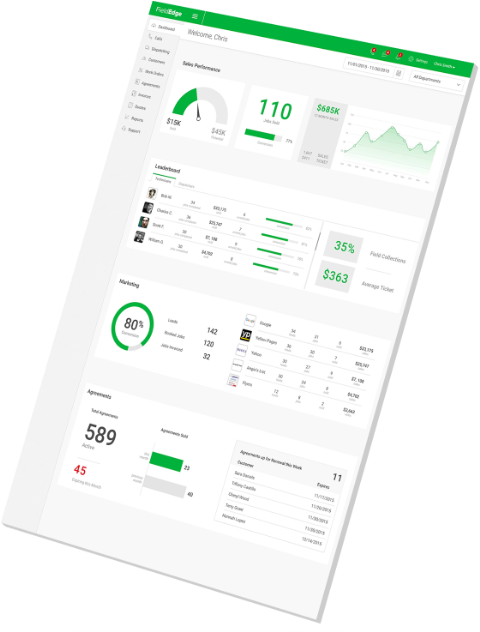
Evaluate FieldEdge's dashboards against the business's own service and financial records. Sample KPI figures and vendor success stories illustrate possible reporting, but do not establish the buyer's future revenue, efficiency or profit.
If warehouse inventory management is required, check both the FieldEdge tier and QuickBooks edition before purchase. FieldEdge's current US pricing matrix lists this tool under Elite and says it is available only to QuickBooks Desktop Enterprise users with Advanced Inventory. The same matrix lists general QuickBooks Online and Desktop connections across all three tiers. Confirm the separate warehouse entitlement in writing and test a representative stock workflow on the proposed setup.
FieldEdge's Consumer Management Portal gives customers a place to view and pay invoices, act on quotes and submit service requests. Its current pricing matrix lists the portal with Elite and as Call for Pricing on Select and Premier. If customer self-service is part of the buying case, request the portal entitlement and cost in writing. Have the vendor demonstrate a fictional customer's login, service-request handoff, quote action and invoice history; treat a submitted request as unconfirmed until staff check scheduling. Use nonlive examples to verify the payment and accounting view before relying on the portal.
If FieldEdge sales staff need good, better, best and budget proposals, distinguish ordinary Quotes from Proposal Pro. FieldEdge's current US matrix lists a single quote option on Select, multiple options on Premier and Elite, and Proposal Pro in Elite or as Call for Pricing on Select and Premier. The vendor says technicians can save, print and email Proposal Pro documents, which sync to FieldEdge for office tracking. In a demonstration, build a fictional four-option proposal and check the price book, revisions and office view before any customer send; request the add-on and license costs in writing. No customer quote was sent here.
If call recording matters in a FieldEdge evaluation, reconcile its two vendor pages before accepting the quote. The call-recording page describes inbound and outbound calls, while the current US pricing matrix lists Outbound Call Recording on Elite and N/A on Select and Premier. Ask FieldEdge to confirm in writing which call directions, plan and setup, recording access and retention terms the quoted configuration covers. Review a fictional call-handling example without recording a real conversation. These pages do not establish inbound recording entitlement for a specific tier.
6 distinct sources behind this profile. Research observed Oct 27, 2026. Features and offers can change.
View sources and research →
