

Find your fit
Who it is for
Each open position or candidate pool can hold candidate profiles, resumes, messages, interview information and hiring-team feedback. Hiring Manager and Member roles have different access, so the team should assign roles deliberately before sharing candidate records.
The work it supports
Core capabilities
Breezy can publish jobs to a branded career site or an embedded list on an existing careers page. After company verification, it sends approved positions to relevant third-party job boards; individual boards decide whether and when to display an ad.
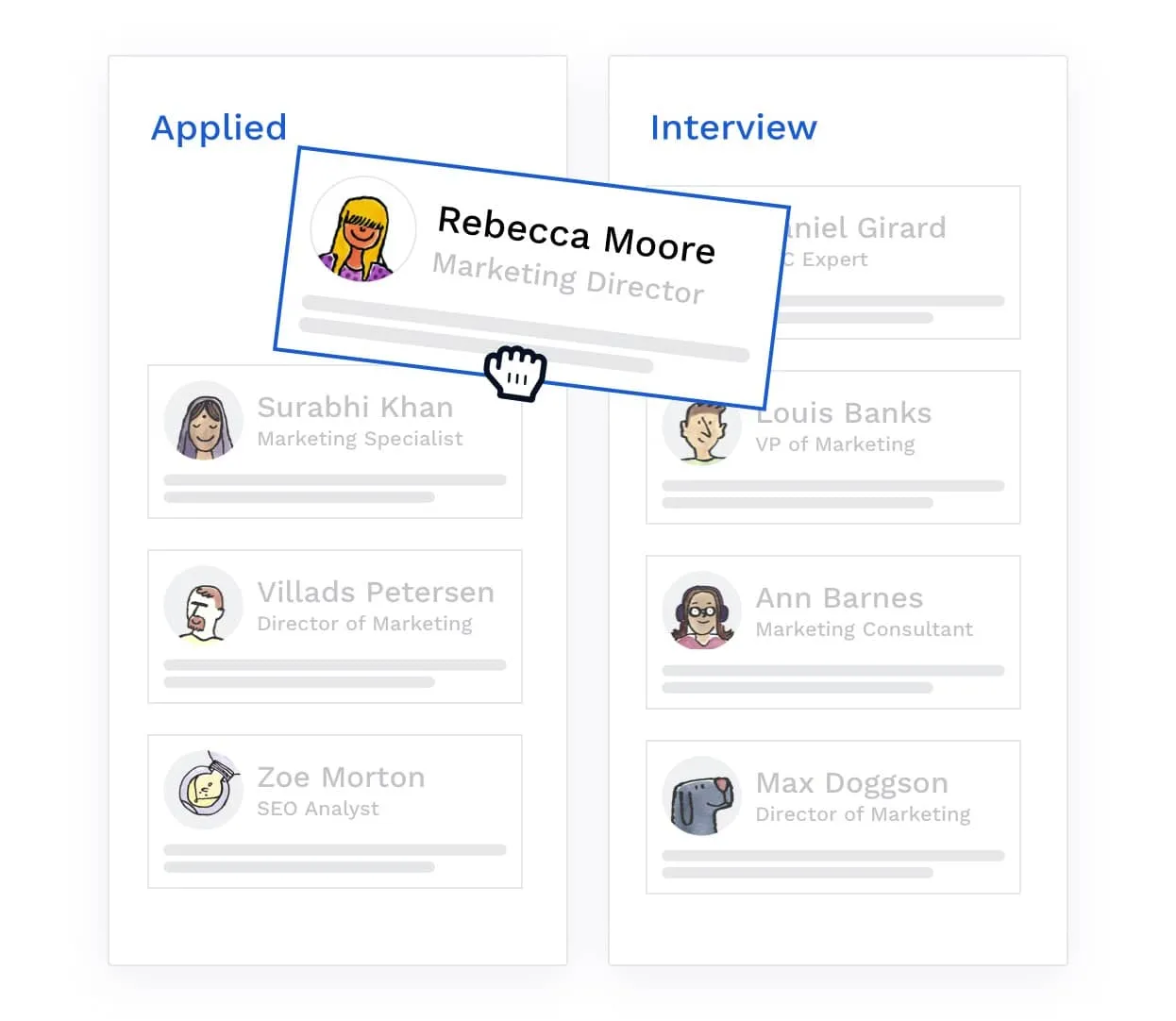
A position has a pipeline with stages such as applied, screening and interviewing. Candidates move between stages so the team can see their status and act from a shared view.
Hiring Managers can schedule interviews from a candidate profile, invite teammates and attach interview guides or scorecards. Paid plans also provide self-scheduling links that let candidates choose among configured available times.
Understand the offer
Pricing and getting started
Bootstrap is a free plan for a narrow hiring flow: one active position or candidate pool at a time, with access to candidates added in the last 30 days. Older records and simultaneous openings therefore need close attention when comparing it with paid plans.
Startup adds unlimited positions and several workflow tools; Growth adds such features as customizable scorecards, interview guides and multiple pipelines. Check the current plan matrix for the precise mix needed by each hiring manager instead of assuming every feature accompanies every paid tier.
The pricing page lists Breezy Intelligence credits, SMS, Onboard, Perform and expert training as optional additions. Premium job-board placements require a separate purchase and are unavailable on free trials; free board distribution does not guarantee that a board will display a posting.
Breezy advertises monthly and annual billing for paid plans and a 14-day trial without a credit card. Its “full feature” trial language does not include premium job-board purchases; confirm which optional additions are enabled before using the trial to choose a plan. Compare the payable term, candidate access and migration needs before committing.
Look a little closer
Before you choose
If customized hiring stages matter, compare plan scope: the default pipeline exists on all plans, paid plans allow admins to customize stages and stage actions, and Growth, Business and Pro allow multiple pipelines. Verify the permissions and plan before relying on those options.
If candidates arrive from career pages, job boards or manual prospecting, inspect the resulting profile for resumes, notes, messages and feedback. Test Hiring Manager and Member access with sample records before sharing applicant data.
If applicant email is part of the workflow, check individual and batch sending, candidate filters, recipient selection and scheduling in the proposed account. Breezy says company verification is required before candidate messaging.
If stage actions will send a message, questionnaire or feedback request when a candidate enters a stage, trial the exact paid-plan pipeline before automating applicant contact or rejection.
Run a sample vacancy from posting to interview: check job-board approval and display, the career page, application questions, hiring-team roles, self-scheduling, feedback and candidate messages. This tests the actual workflow and identifies which paid features are necessary.
Candidate records contain personal information. Confirm access, consent and retention practices for the team's jurisdictions, and inspect the vendor's current terms and data-handling controls. Breezy's tooling can support a process, but does not determine whether the employer's hiring or privacy obligations are met.
For an exit or retention plan, test a candidate export with the intended company or position role. Breezy's CSV includes only the selected columns; choosing Resume puts a link to a PDF in the CSV, not the PDF itself. Complete company-level exports require Admin access, and complete position-level exports require Hiring Manager access. Open a sample CSV and its resume links before relying on it to move or retain records; do not assume the CSV is a complete archive.
Before archiving a position, check Breezy HR's paid-plan Questionnaires report if candidate answers must be retained. Its Questionnaire Answer Export produces a CSV, but the vendor says responses from archived positions are excluded. Company-level reporting requires Admin permission and position-level reporting requires Hiring Manager permission. Have an authorized user open a representative answer export while the position is active, and ask Breezy how to retrieve any already archived responses. No complete applicant archive or real export was tested here.
Before changing Breezy HR plans, export and inspect the candidate records the team needs. Its public retention policy, dated August 25, 2023, says paid-account data is deleted one year after cancellation, or immediately if requested; Bootstrap shows candidates added within 30 days, and expired trials lose access before one-year inactivity deletion. The guide describes ways to regain access by resubscribing or upgrading within those windows. Confirm the current terms with Breezy and the needed records before a downgrade or cancellation; recovery is not guaranteed here.
Before relying on candidate self-scheduling, plan how to change a booked interview. Breezy says a meeting created from a scheduling link cannot be rescheduled in place; staff must first cancel it, then resend a link or schedule the new time manually. Trial that path with a fictional candidate and check the new invitation, calendar entries and interviewer notices before using it for real applicants.
Before giving someone Hiring Manager access, test the Breezy Inbox with fictional candidate conversations in two positions. Breezy says this permission is required for Inbox access; the sidebar view shows candidate message history for every position where the user is a Hiring Manager, while a position's Inbox shows all candidates for that position. The Inbox can switch between the user's own and the hiring team's conversations, and a thread shows team correspondence, not only messages sent by that viewer. Check the intended position and team scope before sharing real applicant conversations.
Before sharing a Breezy HR candidate outside the hiring team, check the Admin's Share Candidate settings. Breezy says an unrestricted domain setting allows a link that anyone can view, though recipients validate an email address; the sharer can include a scorecard, team discussion or questionnaire responses. Set an appropriate expiry and email-domain restriction, then preview and test a fictional profile with the intended recipient. The shared link does not grant wider Breezy access. No real applicant was shared for this profile.
When retiring a Breezy HR vacancy, choose Close, Archive or Delete deliberately. Closing can offer an admin-enabled option to disqualify unhired candidates; Archive hides the position without deleting it. An Admin's Delete is irreversible, removes position or pool data from reports and removes associated candidates from Breezy. Move candidate information worth keeping to another position or pool first, and check required reporting before deleting a real vacancy.
When a candidate appears in multiple Breezy HR positions, distinguish the default combined view from merging records. Combining shows history across separate position-linked profiles, subject to role access; an admin merge consolidates up to three profiles into one selected position and cannot be undone. The other merged profiles are removed, and scorecards outside the selected master record and position can be lost. Use synthetic duplicate records to decide whether shared visibility is enough before considering a merge.
Treat a Breezy HR custom scorecard as a shared evaluation rubric. Breezy says custom scorecards require Growth, Business or Pro, and an Admin creates or edits them. Its Help warns that changing a scorecard's settings removes existing feedback in custom sections; it also provides a way to clone a scorecard. Before changing a live rubric, review and preserve any feedback the hiring team needs, then trial the revised criteria with a fictional position and check what existing candidate views retain.
For Breezy HR stage messages, check the delay and time zone before moving candidates through a live pipeline. Stage Actions are available on paid plans, require Admin or Hiring Manager rights to edit, and trigger only on a candidate's first entry into a stage. With Avoid Nights and Weekends enabled, Breezy uses the company location's time zone for its 8 am–6 pm Monday–Friday sending window. If no company location is set, that option instead uses the triggering user's time zone for a manual move and GMT/UTC for automation. Review the company location, trigger path, template and sender with a fictional candidate before enabling applicant contact; a scheduled action alone does not confirm delivery.
For Breezy HR SMS, a career-portal applicant is asked for consent by default; a job-board, referred or manually added candidate may need a separate email request, sent from the profile, candidate list or a stage action. Check SMS Consent Status before texting. SMS sending needs the add-on, and conversation access needs Hiring Manager or an appropriate custom role. Standard SMS covers US and Canada; confirm custom-plan support elsewhere. Verify account rights, consent and delivery with authorized test records before contacting real candidates.
Before relying on Breezy HR's spam email filter, check the company-wide Admin setting: it defaults on for accounts created after September 9, 2026, and flags applicants with disposable or temporary email domains. Manually added candidates and those already in the pipeline before enablement are not scanned. A flagged applicant waits for reviewer Allow before email verification or questionnaire-based stage moves; review requires Hiring Manager or an eligible custom role. Delete permanently removes the profile. Rehearse review with fictional applicants and confirm the setting and permissions before using it with real candidate data.
Before using Breezy HR's Mark Private control for a sensitive applicant, walk through a fictional candidate with the intended hiring roles. Breezy says the candidate still appears in pipeline and candidate views, while profile details are accessible only to Company Admins and the person who marked it private. Other team members can see that it is private and who marked it. Only Company Admins and Hiring Managers for the position can mark a profile private. Check whether those visibility boundaries suit your process before adding real candidate details.
For Breezy HR's optional GDPR consent workflow, map expiration before enabling automation. The guide says candidate consent lasts 24 months by default; Admins can change the period and separately turn on automatic renewal requests or automatic removal of expired candidates. With fictional candidate dates, decide who will review Pending, Expiring and Expired status and whether either switch fits the organization's retention policy. Breezy recommends separate legal advice; these settings alone do not establish compliance.
Before treating Breezy HR applicant counts as a verified candidate pool, check its company-wide Candidate Email Verification setting. When enabled, eligible new career-portal applicants receive an email code and enter the Email Unverified stage until they verify; manually added or pre-existing candidates and questionnaire-disqualified applicants do not get that automatic email. Breezy counts an application as applied in reports at submission even while unverified, and manually moving someone out of Email Unverified does not change their verified status. With fictional records, have an Admin compare the pipeline stage, verification badge and report count, then decide who follows up on unverified candidates; a code check alone does not prove identity or rule out fraud.
30 distinct sources behind this profile. Research observed Oct 27, 2026. Features and offers can change.
View sources and research →
