
Find your fit
Who it is for
UK small and medium-sized organisations that need a shared system for personnel records, holiday requests and routine HR administration are the main fit. The plans scale by employee band rather than a per-person subscription fee, while the number of full HR users differs across bands. Count both employees and administrators before choosing a tier.
Teams onboarding new starters or coordinating performance conversations may benefit from the task, document and appraisal tools. Check the exact module: Breathe promotes tailored onboarding tasks, while its current feature table places an onboarding workflow inside the chargeable Recruitment add-on. A buyer should ask which onboarding steps are included in the proposed subscription.
The work it supports
Core capabilities
Keep employee information together. People profiles can hold contact, job and pay details. Set role permissions for sensitive fields when configuring the organisation's records.
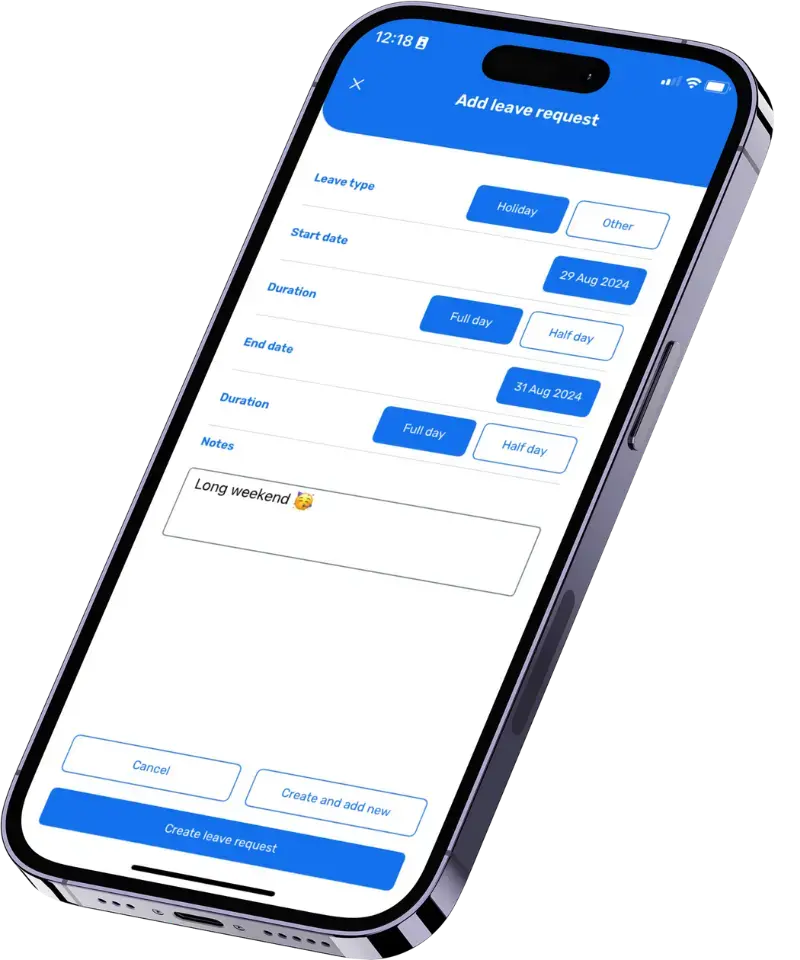
Manage leave requests, approvals and allowances in one place. Employees can request holiday and other leave, and managers can review upcoming absences. Check advanced approval and policy rules against the proposed plan.
Coordinate onboarding tasks for new starters. Breathe describes role-specific tasks, policies and documents. Its feature table places a dedicated onboarding workflow under the paid Recruitment add-on, so confirm which steps the proposed subscription includes.
Understand the offer
Pricing and getting started
UK core HR pricing starts with a Micro band for one to ten employees, then increases through Starter, Regular, Pro, Premium and Plus bands. The public table shows monthly and discounted annual options, excludes VAT and prices optional modules separately. The buyer should match the employee band, HR-user allowance and add-ons to a current quote rather than using the entry price for a larger team.
Breathe offers a fourteen-day trial without payment-card details at the start. The trial includes core features and add-ons, with additional modules switched on by default; these can become chargeable after the trial. Before subscribing, review the enabled modules and the plan restrictions for finance permissions, time logs and other needed functions.
Look a little closer
Before you choose
Map the data and permissions before loading personnel records: which details employees may edit, what managers may approve, which documents are restricted, and how sickness or performance information is handled. The product offers role controls and a UK-hosted service, but vendor descriptions alone do not prove that a particular configuration meets an organisation's privacy or employment obligations.
Check capacity if the team may exceed 200 employees. The current pricing matrix's largest listed band is 151–200, while Breathe's homepage and employee-record page describe use up to 250. Ask sales how the 201–250 range is licensed and supported instead of assuming the Plus price extends automatically.
Trial a real leave request, onboarding handoff and payroll export before committing. Confirm whether the necessary recruiting, rota, expenses, learning or health-and-safety functions are paid add-ons, and check the annual discount, VAT, cancellation and renewal terms in the actual order. No efficiency gain, compliance outcome or payroll execution is verified by this profile.
Let employees handle approved self-service tasks. Staff can view documents, update permitted details, book time off and report sickness through web or mobile access. HR can keep central records while deciding which fields and actions each role can use.
Keep documents and performance activity with the HR record. The feature table describes company and person documents, e-signature tracking, one-to-ones, appraisals, objectives and reporting. Availability varies by plan, so check the specific rows for document controls and performance functions required by the team.
Export payroll-ready data. Breathe lists payroll export and a Xero Payroll integration, which can move HR information into a payroll process. Storing pay details or exporting data is different from calculating pay, taxes, deductions or making payments; confirm how the organisation's payroll system will receive and verify the information.
If you may leave Breathe, plan an export rehearsal before the account closes. Breathe says application data can be exported, while documents can be downloaded individually. Inventory the employee records and files you must retain, then test a permitted sample data export and download a sample document; check what each route actually contains. The payroll-ready export used for pay runs should not be assumed to preserve the full HR record or its documents.
In a fictional year-end walkthrough, inspect an employee's unused leave and a new request. Breathe says its holiday planner accounts for carry-over and can automatically approve requests up to a department limit. Confirm how the assigned carryover allowance and use-by date affect the next year's balance, which approval rules are available on the quoted plan, and who receives the request or approval notice before relying on that workflow.
Check two-factor authentication when evaluating access to personnel records. Breathe says it is an option that can be switched on in settings; once enabled, people enter an authenticator-app code as well as their password when signing in. In an authorised demo, confirm who will enable the setting, how staff will set up their authenticator apps, and the recovery route if someone loses access to a code. Do not assume it is enabled by default.
For policies and contracts, distinguish read tracking from signature collection. Breathe's UK document page describes tracking who has read a shared document and sending reminders, and separately supports sending to multiple signees with each signature logged by time stamp and IP address. In a fictional demonstration, set the intended document audience, verify the read list and reminder path, then collect two sample signatures and inspect the record available to HR. Confirm that the quoted UK plan includes these controls before relying on them for a document handoff.
To evaluate sickness-pattern review in Breathe, use fictional employee records. Its UK pages describe an absence dashboard showing who reported sick and who authorised an absence, automatic Bradford Factor scores, and sickness triggers with settable thresholds. Confirm which tools the quoted plan includes, who can see absence details and scores, what thresholds create flags, and who reviews them. Treat a score or flag as a prompt for human assessment, not an automatic medical or employment conclusion.
To assess Breathe's UK Expenses add-on, use a fictional mileage claim with a sample receipt. Breathe says employees can submit claims and upload receipts, configured spending limits warn before submission, and managers can review and approve from the app or desktop. The dashboard can export receipts and data ready for payroll. The add-on requires Core HR and an extra charge. Check whether an over-limit warning lets the claim continue, which manager approves it, and what the export contains before relying on a reimbursement handoff. No real claim, payment or payroll run was tested.
In a fictional leaver walkthrough, check what happens after a person is marked as a leaver in Breathe. The vendor says that profile and its data stay in the system for the life of the account without counting toward plan size, and an individual profile can be deleted manually. Confirm that the holiday, contract and pay information HR needs remains findable, inspect the active-person count on the quoted plan, and decide who may delete a record under the organisation's retention policy. This in-account check complements the separate account-exit export rehearsal. No real employee record was changed or deleted.
13 distinct sources behind this profile. Research observed Oct 22, 2026. Features and offers can change.
View sources and research →
